Choosing the right cloud VM and GPU is essential for smooth pixel streaming. This guide covers the cloud providers, VM types, and GPU specs we support, and how to pick the right one for your app and event.
Two Ways to Set Up Your Streaming Infrastructure
Before anything else, decide which setup path works best for you:
Option 1. Bring Your Own VM
You already have (or want to set up) your own cloud VM on AWS, GCP, Azure, CoreWeave, or Oracle. In this case:
-
You provision the VM yourself under your own cloud account
-
You share your VM details (provider, GPU, VRAM, CPU, memory) with us.
-
We confirm whether your VM meets the hardware requirements for your app, and configure pixel streaming on top of it.
Option 2. Request Our VM
You’d rather not manage your own cloud infrastructure. In this case:
-
We provision and manage a VM on your behalf, on the cloud provider and VM type best suited to your app.
-
You only need to give us your App URL so we can determine the right specs.
-
We handle setup, hosting, and pixel streaming configuration for your event end to end.
Either way, the first step is the same: share your App URL with us so we can check the hardware specifications your app needs to stream properly.
Getting Started
Step 1. Share Your App URL
If you’re hosting an event with us, please provide the App URL first (regardless of which option you choose above). We use this to check the hardware specifications your app actually requires to stream. This lets us:
-
Confirm whether your requested/existing hardware (Option 1) is sufficient for the event.
-
Recommend or provision the right VM type and specs on your behalf (Option 2).
-
Flag alternative VM types or specs if your current selection would lead to poor performance.
Step 2. Tell Us Your Requirements
If you’re going with Option 1 (Bring Your Own VM), please provide:
|
Requirement |
Description |
|---|---|
|
Cloud Provider |
Your preferred cloud provider (AWS, GCP, Azure, CoreWeave, or Oracle). |
|
GPU |
The specific GPU model your application requires. |
|
VRAM |
The minimum amount of GPU video memory (VRAM) required for your application to run smoothly. |
|
CPU |
The required CPU core count or performance tier. |
|
Memory (RAM) |
The amount of system memory required for your application and the Pixel Streaming pipeline. |
If you’re going with Option 2 (Request Our VM), you don’t need to specify hardware yourself, just send us your App URL and preferred cloud provider (if you have one), and we’ll recommend and provision the matching VM type and specs from the options below.
Important
-
Don’t undersize your VM to save money: Cheapest ≠ Best Fit.
-
Underpowered hardware can cause lag, stutter, or stream failure during a live event.
-
Choose your VM based on your app’s actual requirements (verified via the App URL check), not price alone.
-
Not sure what you need? Ask us to confirm the minimum viable spec before picking a lower-cost option.
Supported Cloud Service Providers
We support any cloud provider you’d like to use, we’re not limited to a fixed list. If you’re bringing your own VM (Option 1) or have a preferred provider, we’ll work with it.
Below are the major providers with ready-made, pre-configured VM types and GPU options we commonly set up. If your preferred provider isn’t listed, just let us know along with your App URL and we’ll confirm compatible hardware for it.
You should provide us with :
-
Your preferred cloud provider.
-
The GPU required by your App.
-
VRAM.
-
CPU.
-
Memory.
1. AWS
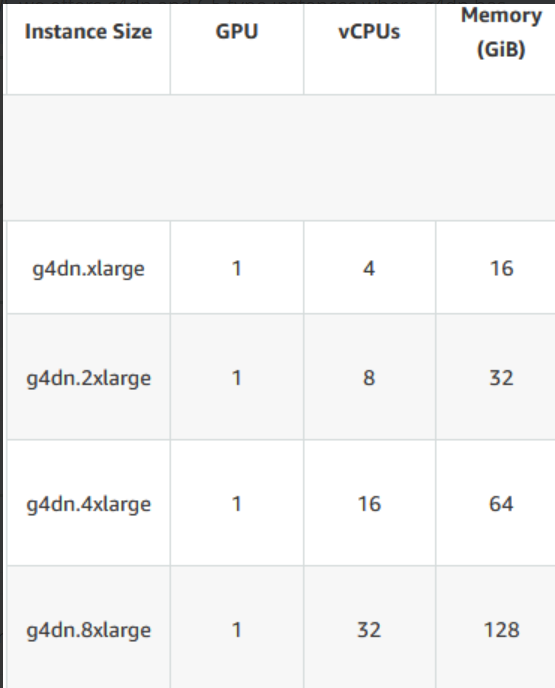
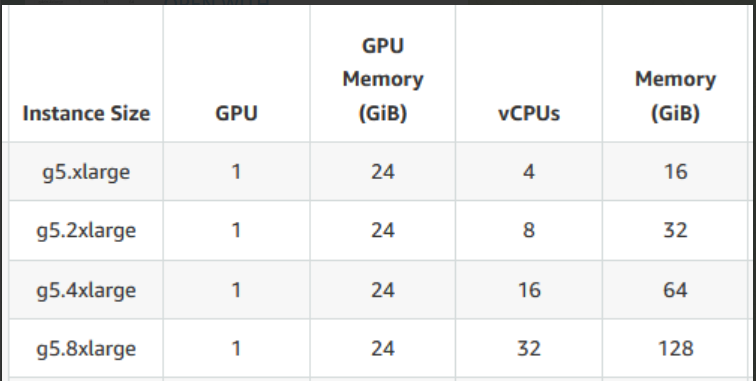
We offer g4dn and g5 type instances where g4dn has Nvidia T4 GPU and g5 has Nvidia A10 GPU.
2. GCP
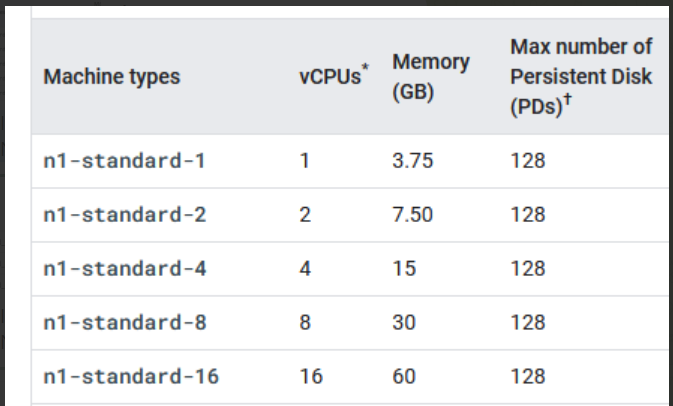
We offer n1-standard VMs which has Nvidia T4 GPU. (See image below)
3. Azure
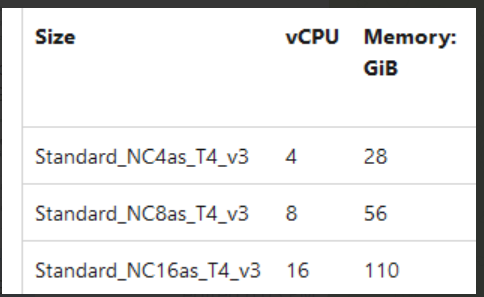
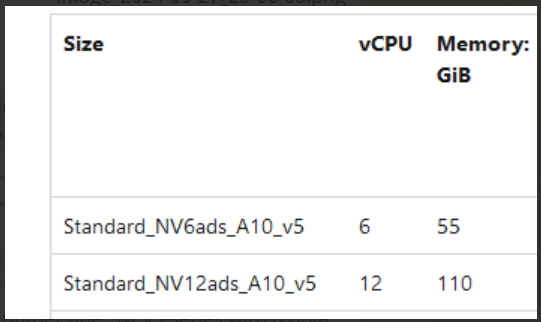
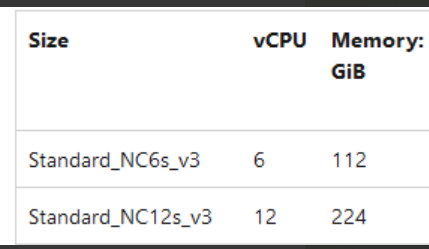
In Azure, We offer and support the below VM series :
-
Standard_NCasT4_v3 series VMs with Nvidia T4 GPU.
-
Standard_NVadsA10 v5-series with Nvidia A10 GPU.
-
Standard_NC_v3-series with Nvidia Tesla V100.
4. Coreweave
We offer these GPU types :
-
NVIDIA Quadro RTX 4000.
-
NVIDIA RTX 5000.
-
NVIDIA RTX A6000.
-
NVIDIA A10.
Note : The Vcore and memory are adjustable.
5. Oracle
To be filled soon.
Choosing the Right Spec for Your App
-
Match GPU and VRAM to your app’s rendering/model requirements first, this is usually the biggest performance bottleneck for streaming.
-
CPU and memory should comfortably cover your app’s baseline needs plus overhead for the streaming/encoding pipeline, not just the bare minimum to launch the app.
-
If your app is borderline between two tiers, choose the higher tier for live events, a stable, well-performing stream matters more during an actual event than saving on hourly VM cost.
-
When in doubt, submit your App URL so we can verify before the event, rather than discovering a shortfall during the live stream. This applies whether you’re managing your own VM or asking us to provision one.
Network & Region Considerations
-
Bandwidth: Pixel streaming is bandwidth-intensive. Make sure the streaming VM has sufficient upload bandwidth, and that your viewers have a stable, reasonably fast internet connection.
-
Region: Choose (or ask us to choose) a VM region geographically close to your audience, this reduces streaming latency and improves the viewing experience.
-
Latency-sensitive apps: If your app requires real-time interaction (e.g., live control, low-latency input), region selection matters even more, request the closest available region to your primary audience.
Lead Time & Testing
-
Please share your App URL and setup preference (Option 1 or 2) at least a few business days before your event so we have time to verify specs, provision resources, and troubleshoot if needed.
-
We recommend a short test/rehearsal stream before the live event to confirm everything performs as expected.
Pricing
VM costs vary by provider, instance type, and usage duration (hourly vs. reserved). Contact Our Support Team for current rates so you can weigh cost against the performance your app needs.
Need help?
If you need any assistance, feel free to reach out through any of the following channels:
🛠️ Support Portal: Contact Our Support Team
💬 Discord Community (Faster Support): Join Our Discord Community
📧 Email Support: support@eagle3dstreaming.com
Follow us on:
Facebook | GitHub | LinkedIn | YouTube