Apps, links and versions
Managing apps in the Eagle 3D Streaming Control Panel: stream links, which version a link plays, uploading new versions, going back to an older version, and deleting what you no longer need.
Stream links
A stream link is the URL you share. Generate one from your app in the Control Panel, then attach a configuration to it — the settings belong to the link, not to the app, so one app can have several links behaving differently.
- Copy the URL to share it.
- Play starts a session yourself, for testing.
- Delete a link when it should stop working. Anyone holding a deleted link can no longer stream — which is the fastest way to revoke access you have already given out.
Which version a link plays
A link with no version in it always plays the newest version of its app — also after every later upload, so a link you shared once never needs replacing. A link with a version in it always plays that one version.
| Link | Looks like | Plays |
|---|---|---|
| Standard link | /v5/<account>/<app>/<configuration> | The newest version, every time |
| Standard link with a version | /v5/<account>/<app>/<configuration>?appVersion=<version> | Always that version, even after newer uploads |
| Short link | /v6/<code> | The newest version, or the version chosen when the link was copied |
For example, for the app MyApp of the account demo with the configuration default:
| Version chosen | Standard link | Short link | Plays |
|---|---|---|---|
| Latest | https://connector.eagle3dstreaming.com/v5/demo/MyApp/default | https://connector.eagle3dstreaming.com/v6/eyJvd25lciI6ImRlbW8iLCJhcHBOYW1lIjoiTXlBcHAiLCJjb25maWdOYW1lIjoiZGVmYXVsdCJ9 | The newest version of the app, every time — also after you upload more |
| A specific version (here 3) | https://connector.eagle3dstreaming.com/v5/demo/MyApp/default?appVersion=3 | https://connector.eagle3dstreaming.com/v6/eyJvd25lciI6ImRlbW8iLCJhcHBOYW1lIjoiTXlBcHAiLCJjb25maWdOYW1lIjoiZGVmYXVsdCIsImFwcFZlcnNpb24iOiIzIn0= | Always version 3, even after you upload versions 4, 5 and 6 |
Reading a standard link
https://connector.eagle3dstreaming.com/v5/demo/MyApp/default
| Part | Meaning |
|---|---|
https://connector.eagle3dstreaming.com | The Eagle 3D Streaming address every link starts with |
/v5/ | The kind of link: a standard link |
demo | Your account (user name) |
MyApp | The app |
default | The configuration: the settings the stream uses |
| (no version) | Plays the newest version of the app |
The same link with version 3 chosen — ?appVersion=3 is added at the end, and the link always plays version 3:
https://connector.eagle3dstreaming.com/v5/demo/MyApp/default?appVersion=3
Reading a short link
https://connector.eagle3dstreaming.com/v6/eyJvd25lciI6ImRlbW8iLCJhcHBOYW1lIjoiTXlBcHAiLCJjb25maWdOYW1lIjoiZGVmYXVsdCJ9
| Part | Meaning |
|---|---|
https://connector.eagle3dstreaming.com | The Eagle 3D Streaming address every link starts with |
/v6/ | The kind of link: a short link |
eyJvd25lciI6ImRlbW8iLCJhcHBOYW1lIjoiTXlBcHAiLCJjb25maWdOYW1lIjoiZGVmYXVsdCJ9 | Your account (demo), the app (MyApp) and the configuration (default), in encoded form |
| (no version) | Plays the newest version of the app |
The same link with version 3 chosen — the version goes inside the encoded part, so the whole code changes, and the link always plays version 3:
https://connector.eagle3dstreaming.com/v6/eyJvd25lciI6ImRlbW8iLCJhcHBOYW1lIjoiTXlBcHAiLCJjb25maWdOYW1lIjoiZGVmYXVsdCIsImFwcFZlcnNpb24iOiIzIn0=
You get a short link when the configuration hides the account and app names. Because the version is inside the code, you cannot see it by looking at a short link.
Where the version is chosen
| Page | Version choice | Links play |
|---|---|---|
| Streaming Apps | A version dropdown next to each link: Latest (the default) or one of the app's versions | Latest: the newest version, always. A version: that version, always. |
| Projects | None | The newest version of the project's app, always |
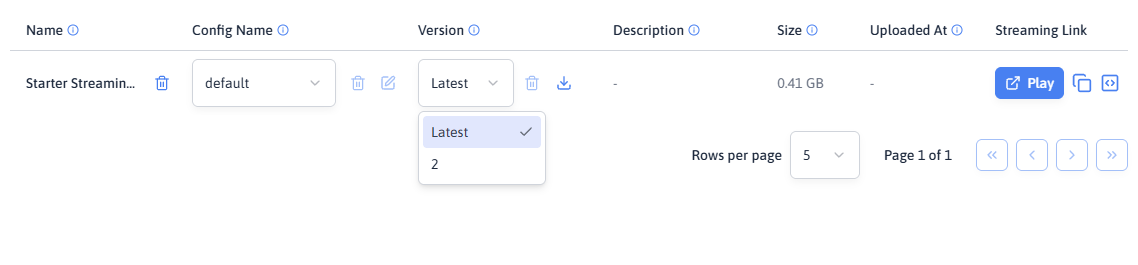
If you are not sure which version a link you shared plays, copy a fresh one from Streaming Apps with Latest selected in its version dropdown, or from Projects.
New versions
Use Upload a new version on the app's card and upload the new ZIP. It is added as a new version and becomes the newest one; the older versions stay and can still be chosen for a link.
Next to the version dropdown are two buttons: download gets that version's ZIP back, and delete removes that version. The newest version cannot be deleted.
Going back to an older version
When a new build turns out to be broken:
- For one link: choose the older version in the link's version dropdown and share that link. It keeps playing that version until you fix the build and switch the link back to Latest.
- To make every Latest link go back: download the older version with the download button, then upload it again with Upload a new version. It becomes the newest version.
Do not delete a version until the one after it has proven itself.
Deleting an app
Delete App removes the application and all its versions. Its stream links stop working. This is not reversible, and uploading again creates a new application rather than restoring the old one — so any links you had shared stay dead.
The six phases an upload passes through, and what a stall in each one means.
Related
Last updated