Eagle 3D Streaming's appstream streams almost any Windows application to a browser - a desktop tool, a configurator,
a game, a viewer built with any engine - with no plugin and no change to the app. The application runs on an Eagle 3D
Streaming GPU machine and the viewer uses it in a web page. appstream is in beta and free while in beta.
Stream your app: step by step
Zip the app's folder - the whole folder with the .exe and everything it needs, as a
.zip file.
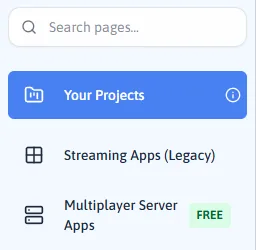
In the Control Panel, open Your Projects in the left menu.
Your Projects, at the top of the left menu.
Click New project, at the top right of the page.
The New project button.
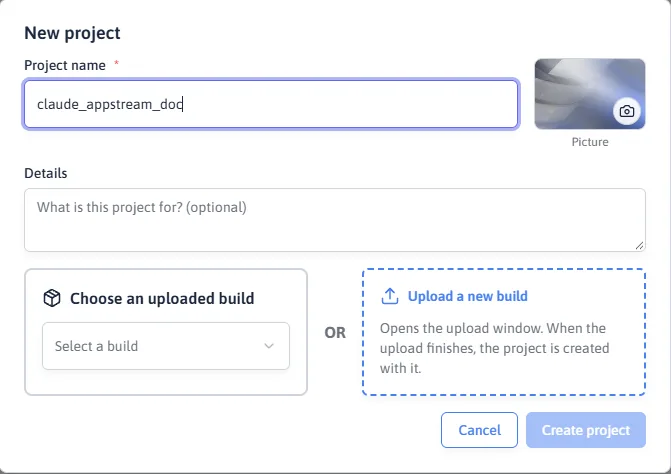
Type a Project name, then click Upload a new build and choose your zip.
Name the project first - then Upload a new build opens the upload window.
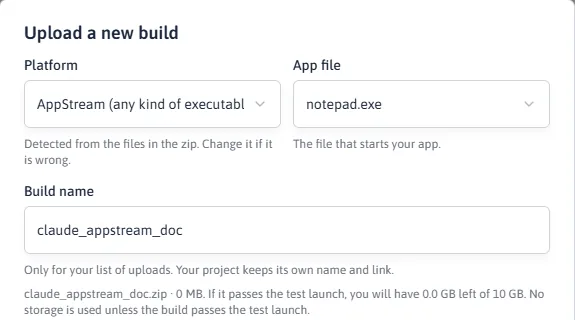
The Build name is filled in from the zip's name; change it if you like (letters, digits and _
only).
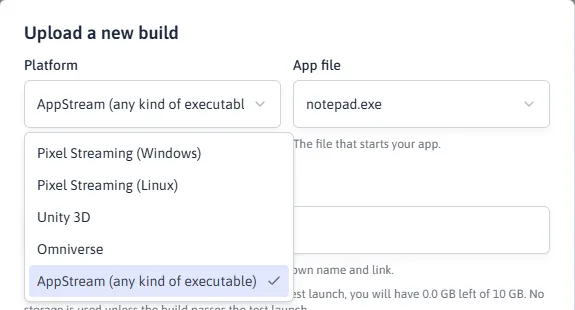
After choosing the zip: Platform, App file and Build name.
Under Platform, make sure AppStream (any kind of executable) is selected - the
window picks it itself when the zip holds an ordinary Windows app. Under App file, pick the
.exe that starts your app.
AppStream (any kind of executable), the last choice in the Platform list.
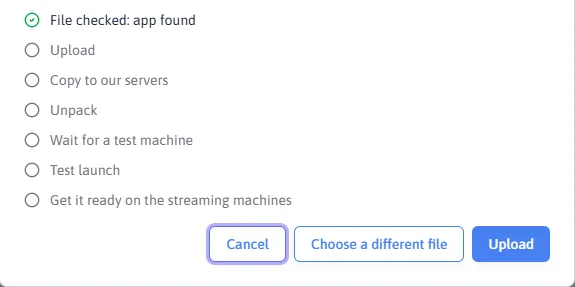
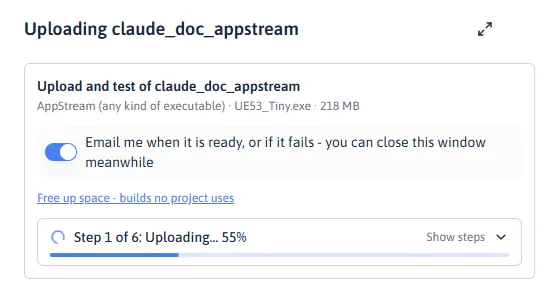
Click Upload. The window lists every step and ticks each one off: Upload, Copy to our servers,
Unpack, Wait for a test machine, Test launch, and Get it ready on the streaming machines. Keep the
window open until it says Test launch passed - or leave Email me when the build is
ready on and close it.
The steps the upload goes through, before Upload is pressed.After Upload is pressed: the bar shows how far the current step has got.
Your project is created with a streaming link - click Copy and open it in a
browser, or send it to your viewers.
An Unreal build without the Pixel Streaming plugin can be streamed this way too, exactly as it is. If the test
launch fails, write to support@eagle3dstreaming.com with the build name.
AppStream or the engine's own streaming? It depends on the plugin, not the engine
Unreal, Unity and Omniverse have their own streaming technology, but it only works when the app was built
with its streaming plugin inside. Being made with Unreal is not enough: an Unreal build packaged
without the Pixel Streaming plugin cannot use Pixel Streaming. AppStream needs no plugin at all - it streams the
app's window as it is.
Your build
Choose this Platform
Unreal, with the Pixel Streaming plugin
Pixel Streaming (recommended - best quality and control)
Unreal, without the plugin (for example a build made for another streaming service)
AppStream - or enable the plugin, package again and choose Pixel Streaming
Unity with Unity Render Streaming / an Omniverse Kit app with its streaming extension
Unity 3D / Omniverse
Unity or Omniverse without it
AppStream
Any other Windows application
AppStream
With the engine's streaming plugin
AppStream
Change to the app
the plugin must be in the build
none
Messages between your web page and the app
yes, through the plugin
no - the app sees mouse and keyboard only
Viewer input
mouse, keyboard, touch
mouse and keyboard
What your application needs
It runs on Windows 10 or 11 and starts without a person clicking through a setup or login screen first.
It can be started from a command line or a shortcut, and keeps running until the session ends.
Anything it needs (runtimes, licences, data) is in the upload, or support is told what to install.
Frequently asked questions
Can I stream a Windows application to a browser without changing it?
Yes, with appstream. The application runs unchanged on an Eagle 3D Streaming GPU machine and its window is streamed
to the browser, with mouse and keyboard sent back.
Does it work with apps that are not games or 3D engines?
Yes. appstream does not care how the window is drawn. GPU-heavy applications benefit most, because the machine has
a dedicated NVIDIA GPU.
Can viewers use a phone?
The stream plays on a phone. Touch input for appstream is still being completed during the beta; mouse and keyboard
are what is supported today.