Two Pixel Streaming plugins in one app: why only one can stream
Unreal has two Pixel Streaming plugins. An app can ship with both switched on, and many recent ones do. They do not share the work: both try to start the stream, only one can deliver it, and which one wins changes from one session to the next. Here is what happens, what a launch option can switch off, what it cannot, and the one fix that always works.
Does this look familiar?

To be sure, open Edit > Plugins and search "pixel streaming":
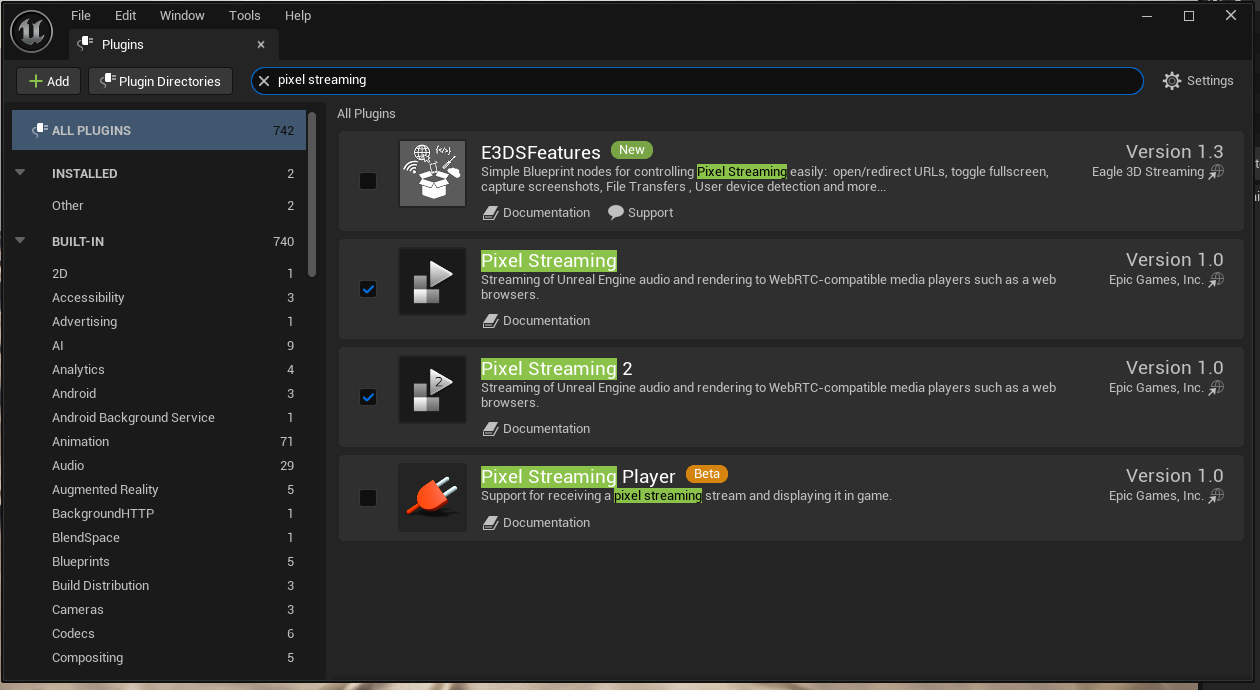
You will probably never see it go wrong. Some of your viewers will.
Day 1 Meet Sam. Sam starts a project with the Pixel Streaming plugin. Everything works.
Day 2 Pixel Streaming 2 arrives with new features. Sam needs one of them — call it feature X — that only Pixel Streaming 2 has. Sam ticks Pixel Streaming 2, keeps the old one ticked, builds, tests: feature X works. Lucky Sam.
Why lucky? Because in the black log window of a Development build, these lines were there all along:

LogPixelStreaming and LogPixelStreaming2 both start, and both connect.Both plugins start, both reach for the same stream, and only one of them wins it. On Sam's tests Pixel Streaming 2 happened to win, so feature X worked.
Day 3 Sam uploads the app. The fight now happens again every time a viewer opens the link. Most viewers get Pixel Streaming 2 and everything works. But say 5 viewers out of 100 get the old plugin. For them, Pixel Streaming 2 is loaded with feature X ready — it is just not the one in charge, so feature X never fires. Sam tests again, it works, and Sam never finds out.
Day 4 Sam goes further: the web page and the app now talk through Pixel Streaming 2's nodes. Viewers sign in on the page, the page sends the details to the app, the app checks them and answers. For most viewers it works. For those few, the old plugin is in charge: the message never reaches Sam's Pixel Streaming 2 nodes, and the viewer presses Sign in again and again — and nothing happens.
Sign-in is only the example. Anything that relies on the page and the app talking to each other can fail this way, for some viewers only.
The fix is one untick: keep only the plugin you use — see what to do below. The rest of this page explains what happens and how to check your app.
Two plugins that do the same job
Pixel Streaming is what turns an Unreal app into a video that plays in a web page. Since Unreal 5.5 it comes as two separate plugins:
- Pixel Streaming plugin (old one) - the original plugin;
- Pixel Streaming 2 - the newer plugin, which Epic is moving everyone to.
Both do the same job: capture the app's picture, encode it, and talk to the signalling server that connects the viewer's browser. Nothing in the Unreal editor stops a project from having both switched on. It usually happens by accident: Pixel Streaming 2 is turned on for a new project, or an old project is upgraded to 5.7 or 5.8, and the Pixel Streaming plugin (old one) is never turned off.
Among the Unreal apps streamed on Eagle 3D Streaming recently, about 4% ship with both plugins - and every one of them is built with Unreal 5.7 or 5.8.
With both enabled: a race, and only one winner
When the app starts, each plugin does what it was built to do, without knowing about the other one: it creates a streamer and connects to the signalling server, under the same name. The signalling server now sees two streamers that both claim to be this app. When the viewer arrives, the viewer is handed to one of them. That one sends the video. The other stays connected and does nothing.
A stream is one connection between two ends: the viewer's web page and the plugin that won. Everything the page sends to the app — clicks, keys, sign-in details, any message — travels inside that one connection. The other plugin is connected to the server, but it has no connection to the viewer, so it never receives those messages.
With both plugins on, only one of them receives what the page sends — never both.
In testing with an Unreal 5.8 app that ships both plugins, the winner changed between runs of the same app: sometimes the Pixel Streaming plugin (old one) carried the video, sometimes Pixel Streaming 2. Both plugins can never stream to the same viewer at once.
That matters because the two plugins are not the same inside. They use different encoder settings, different quality scales and different Blueprint nodes. An app built and tested with one of them can behave differently when the other one happens to win the race - and a viewer who reloads can get the other plugin.
Switching a plugin off with a launch option
Unreal has a launch option that switches plugins off when the app starts: -DisablePlugins=. On
Eagle 3D Streaming it can be added to a project's launch options. Here is what it does to an app that ships both
plugins (Unreal 5.8, packaged build):
| Launch option | Pixel Streaming plugin (old one) | Pixel Streaming 2 | Who streams |
|---|---|---|---|
| none | starts and connects | starts and connects | whichever wins the race |
-DisablePlugins=PixelStreaming | still starts and connects | starts and connects | whichever wins - nothing changed |
-DisablePlugins=PixelStreaming2 | starts and connects | fully off | the Pixel Streaming plugin (old one), every time |
-DisablePlugins=PixelStreaming,PixelStreaming2 | still starts, without its hardware video encoder | fully off | the Pixel Streaming plugin (old one), with slow software encoding - or no video |
Two things stand out.
Unreal marks it as disabled, but in a packaged build its code is part of the app itself. It still starts, still connects and keeps listening — exactly as before.
Switching off both plugins is worse than doing nothing: the old plugin still runs, but the video encoder it relies on is gone, so it falls back to slow software encoding — and on some machines produces no video at all.
With -DisablePlugins=PixelStreaming2 it does not start, does not connect and leaves no trace in the
log. The Pixel Streaming plugin (old one) is then the only streamer and serves every viewer. Nothing to worry
about here.
The plugin that can be removed is the one you want to keep
Put those two results together and they point the wrong way.
Somebody who switches on Pixel Streaming 2 has normally done it on purpose: it is the plugin they mean to use. So in an app with both, the Pixel Streaming plugin (old one) is the one that should go. But the Pixel Streaming plugin (old one) is exactly the one that cannot be removed from outside the build. A launch option can switch off only the plugin the developer actually chose.
The Pixel Streaming plugin (old one) can be kept quiet without the launch option, by not giving it a signalling server address: it then logs "no signalling server URL has been set" and does not connect. But it is still loaded, still runs its startup code and still occupies memory. How much that costs, and whether an idle Pixel Streaming plugin (old one) has other side effects, has not been measured.
Why Eagle 3D Streaming does not switch one off for you
Each plugin has its own Blueprint nodes: the nodes of the Pixel Streaming plugin (old one) talk only to that plugin, and Pixel Streaming 2 nodes talk only to Pixel Streaming 2. A project that has both plugins switched on may use nodes from either, or from both - sometimes because old nodes were never removed.
- The code of the Pixel Streaming plugin (old one) always loads, so its Blueprint nodes keep working whatever the launch options say.
- Pixel Streaming 2 really does switch off. If the project's Blueprints call Pixel Streaming 2 nodes and Pixel Streaming 2 is switched off, those calls fail while the app runs - the app's own features break, not just the stream.
From outside the build there is no way to see which nodes a project uses. That is why Eagle 3D Streaming never switches off either plugin on its own: doing so could break an app that works today. The choice has to be made in the project, by the people who know which plugin it is built on.
The fix: keep one plugin, in the project
Decide which Pixel Streaming plugin the app is built on, switch the other one off in the project, and package again. Then there is only one streamer, no race, and every viewer gets the same stream.
- In the Unreal editor, open Edit > Plugins and search for "Pixel Streaming". Note which of the two are ticked.
- Decide which one the app uses. For a new app this is normally Pixel Streaming 2.
- Search the project's Blueprints for nodes from the other plugin (Pixel Streaming nodes, Pixel Streaming Input, streamer components). Replace them with the kept plugin's nodes, or remove them.
- Untick the other plugin and restart the editor.
- Package the app and run it once locally with
-log. The log should show only one plugin starting: lines beginningLogPixelStreaming2for Pixel Streaming 2, orLogPixelStreaming/LogPixelStreamingSSfor the Pixel Streaming plugin (old one) - not both. - Upload the new build to Eagle 3D Streaming as a new version.
If the project is lost and you cannot repackage, switch off Pixel Streaming 2 with the launch
option -DisablePlugins=PixelStreaming2. It is the one that switches off cleanly, so the Pixel
Streaming plugin (old one) then serves every viewer, every time.
Do this only if the app does not rely on Pixel Streaming 2 features or Blueprint nodes — those stop working.
If Eagle 3D Streaming sent you this page
Eagle 3D Streaming's automatic health checks watch every session for apps that fail to start their video, freeze, or take unusually long to show a picture. Your app came up in those checks, and when Eagle 3D Streaming's technical team looked closer, they found it ships with both Pixel Streaming plugins enabled.
Having both plugins does not by itself make an app fail - across Eagle 3D Streaming, most apps with both plugins stream well. What it takes away is predictability: which plugin serves a viewer can change from one session to the next, so the stream a viewer gets is not always the one the app was built and tested with. When an app is already having trouble, that uncertainty makes the trouble harder to find and to fix. Keeping one plugin removes it. To reach every viewer the same way, please switch off the plugin you do not use and upload the new build. Eagle 3D Streaming support is glad to check the result with you.
What is not known yet
- How much memory and processor time an idle Pixel Streaming plugin (old one) costs while Pixel Streaming 2 streams.
- Whether the race can cause a freeze in a particular app. On average, apps with both plugins do not fail more often than other apps on Eagle 3D Streaming (Unreal 5.7 and 5.8 apps, September to November 2026), but individual apps vary a lot.
- Whether every Unreal version behaves like 5.8 here. The results on this page come from packaged Unreal 5.8 builds.
Coming soon
Choosing which Pixel Streaming plugin your app uses — the Pixel Streaming plugin, Pixel Streaming 2, or both — right from your project's settings in the Control Panel, without repackaging.
Sources
- Epic Games, Pixel Streaming in Unreal Engine
- Unreal Engine 5.8 source:
PixelStreaming2Module.cpp(when Pixel Streaming 2 creates its streamer),PixelStreaming2PluginSettings.cpp(launch option names),PixelStreaming/Streamer.cpp(the Pixel Streaming plugin (old one) without an address),PluginManager.cpp(-DisablePlugins) - Eagle 3D Streaming tests on its own demo app with both plugins (Unreal 5.8, packaged), November 2026
Related
Last updated